Programming
Dr Vincents Personal Notes
Standard Models + technologies map
1980s: Apple II, commodore 64 | Early DOS
1990s: Dell Dimensions, packard bell desktops | win 95, DX1 - DX7, OpenGL 1-1.2
2000s: Thinkpad, HP, Dell workstations | win XP, Win Vista, win 7, DX8-DX11, OpenGL 1.3 - 3.2
2010s: Thinkpads | win8, win10, DX12, Vulkan, OpenGL 3.3 - 4.6
2020s: Surface series laptops | Win11, Vulkan, AI
Files, Structs
Computers make operations on data.
So first you must learn about digital representation of data.
You must learn binary
You must learn hex
You must learn ASCII
You must learn how to make *readable* files.(not compressed like most files)
You must learn how to make structs
*Then* you will start learning about operations, functions, classes, objects
RAM and CPU
MEMORY, PROGRAM
Address Contents
1000 25
1001 10
1002 instruction & data
│
▼
┌───────────┐
│ CPU │
│ │
│ Registers │ ← temporary values
│ │
│ Opcode │ → tells CPU what to do
└───────────┘
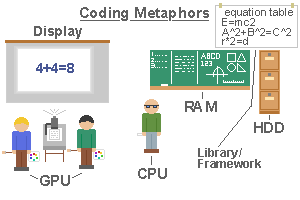
The cpu(the teacher/nerd) works a bit on one problem, then goes to the next, does this in a cycle.
I need to add more devices to the metaphor, USB devices, audio devices.
* Claude( I do believe in specifying AI usage, it is a very powerful useful tool in coding, don't code without it, never, there's always something it can help you with)
* Godot(good if you like modifying the engine into something more personal and custom)
* C#(with ECS gets you good performance)
* VS Code
* Version Control System(best with repos and subrepos, dates)
Program/Dev Structure
Get into readable files and assembly really early if you want to understand computer science.
Code = Abstract, theoretical, not real, imaginary systems
Compiler = turns code into executable machine code, study this a lot to get good at computer science
machine code = actual instructions executed by CPU, you have to jump between audio, user interface, input and graphics manually if you write this.
Scales of gamedev:
* jam-game
* Indie-game
* AAA-game
Data Oriented Programming, Linear Programming
* Structs, routines, subroutines
* Data organized after access
* functions applied to data(The two are separate)
* Main-loop
Open Designs
Open designs, either through copyright running out or being free from get-go, are often useful as base designs for making your own optimized tools.
They are for tinkerers and tool makers seeking niche optimization, not the common user, they are good base designs for making specialized private designs.
The AK-47 has inspired and been base for many newer designs, such is the case with Linux or Godot Engine.
Open designs/tools = great unbloated base for own private designs, tools.
You've surely heard the phrase "designed for everyone, designed for no one"
open designs are made like that, very general, very unspecific base.
DOP -> when you need serious speed, used for special cases
This is very interesting, I will check out data-oriented programming, linear programming, call it what you want, eventually.
All old school programming is linear programming with data structures and routines separated.
large-quantity-Systems + interface
Form of DOP.
When you have lots and lots of something(level tiles, enemies, wires, voxels, polygons), you don't make it as a bunch of objects.(f*ckton of overhead)
You represent the things as something real simple, an array, and maDke an interface for said array.
I find entity-component-systems obfuscating and confusing.
Compact Coding
I like making class/object-less code, for the sake of practicing more old-school style programming.
With very few bits representing everything, player, UI, gameobjects, physics objects.
Scripter vs Programmer
Scripter: uses libraries, no clue about their deeper workings, maybe have some light understanding of compiler and machine code, but never looks inside of them, uses visual interfaces/engines
Real coder/programmer: uses libraries, understands header files, understands multitasking, understands main() function, understands GPU, IO devices, understands the libraries with depth, understands compilers and machine code(live and inactive), understands components, with depth, can read/edit files by hand, abstract thinking, can fix bugs and even modify the libraries.
If you can't read/edit files by hand, if you can't understand live machine code, you are not a real programmer.
Scripter/Programmer is a spectrum, not binary.
Object-oriented Programming
* classes, objects and functions
* Data organized after composition
* Functions tied to classes/objects
* Main-loop
-> Best in general for maintainability and readability
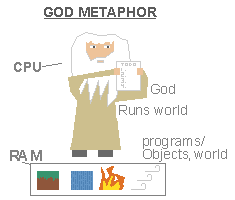
You can think of objects as programs as well.
Think for example about html documents, should they be stored with components separate(folder for html, css, javascript)
or as complete documents(each html document has it's own folder with css folder, js folder, graphics folder)
In most cases you want the latter.
Pro-tip:
First think of the data structures you are working with, then start thinking of the functions.
You can think of source code as the recipe and the executable as the finished dish.
Just like you can reverse engineer a dish, you can reverse engineer an executable.
source: 8-bit guy.
Compiled code != unintelligble
I really don't like it when programing tutorials describe compiled code as an incomprehensible mess, it is not.
Your objects are still right there, just in a different format.
Map File
I like map files that are readable like xml.
I like 3D files that are readable like xml.
Making file formats
Make raw formats first, then compressed versions later
It is no fun working with compressed files first.
raw files are soo much more fun because they are readable and easily editable.
So I have difference-field-format(diff-fields-audio, diff-fields-image, diff-fields-model) = best for storage/compilation
and raw format(raw-model, raw-wave, raw-bitmap) => More fun, editable, playable
Also remember, there is no such thing as lossy compression, the word you are looking for is reduction!
typical file ending composition:
* C(for compressed, omit if not compressed)
* IMG(what type of data)
* F(file)
* R(reduced, if file is reduced for saving memory)
Optimizing
* faster access data layout(remember possessive data layout is rule, this is exception)
* Instancing
* Proceduralizing
* Don't do the same math twice
* LODing(without jarring transitions preferably)
* Culling
* Hashing
* Entity Component Systems
* Simplifying
Sound Effects
Sound effects are like crack, please do include some.
Meta info on software box
Tested setups: for example, Surface 5 laptop, Dell Precision 360 Professional Workstation Win 2000 Pack 4Pro
Target platform: for example, home PC, gaming PC,
Style: for example, 2000s, flat, painted, photo-textured, realism, toon,
LOD: for example, 1024px/m, 2000qds/md, 2048^2px/md
Ideology: for example socialism
Internet, Cyberspace, Web
History
1960s: academic/military networks(inspiration for filters map)
1980s: Bulletin-Boards
1990s: Detached cyberspace, the web is born
Late 2010s: detached algorithm platforms, rise to dominance
Detached Cyberspace is a mistake
I do not see the value in a completely society detached cyberspace.
I want back the networks maps and academic hubs.
network maps, were right
We need to go back to network maps hanging by computers like the ARPANET days.
Difference Field Compression
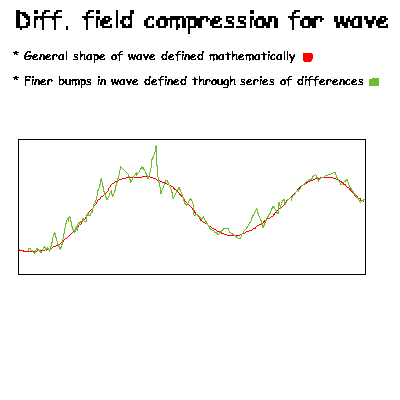
Compression is done using difference fields.
in the file fields of similar values are stored as differences from an absolute, an absolute being anything from a wave to a value to a gradient.
Here AI is particularly useful for identifying fields during compression.
Diff-field compression, cheap to decompress, expensive to compress.
Same amount of information in smaller space = compression.
smaller amount of information = reduction.
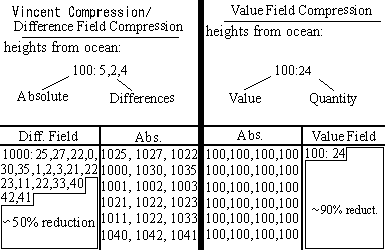
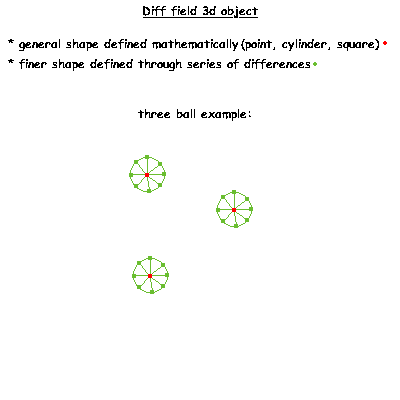 Solid-Field Compression
Means you mark a field as being one value.
Graphics
THE GPU RUNS SHADER CODE, SHADERS ARE FUNCTIONS THAT RUN PER PIXEL/VERTEX
THE GPU RUNS SHADER CODE, SHADERS ARE FUNCTIONS THAT RUN PER PIXEL/VERTEX
THE GPU RUNS SHADER CODE, SHADERS ARE FUNCTIONS THAT RUN PER PIXEL/VERTEX
THE GPU RUNS SHADER CODE, SHADERS ARE FUNCTIONS THAT RUN PER PIXEL/VERTEX
VERTEX = LOCAL MODEL SPACE
FRAGMENT = RELATIVE CAMERA/VIEW SPACE
The amount I had to dig for the above facts is stupid.
My favorite algorithms:
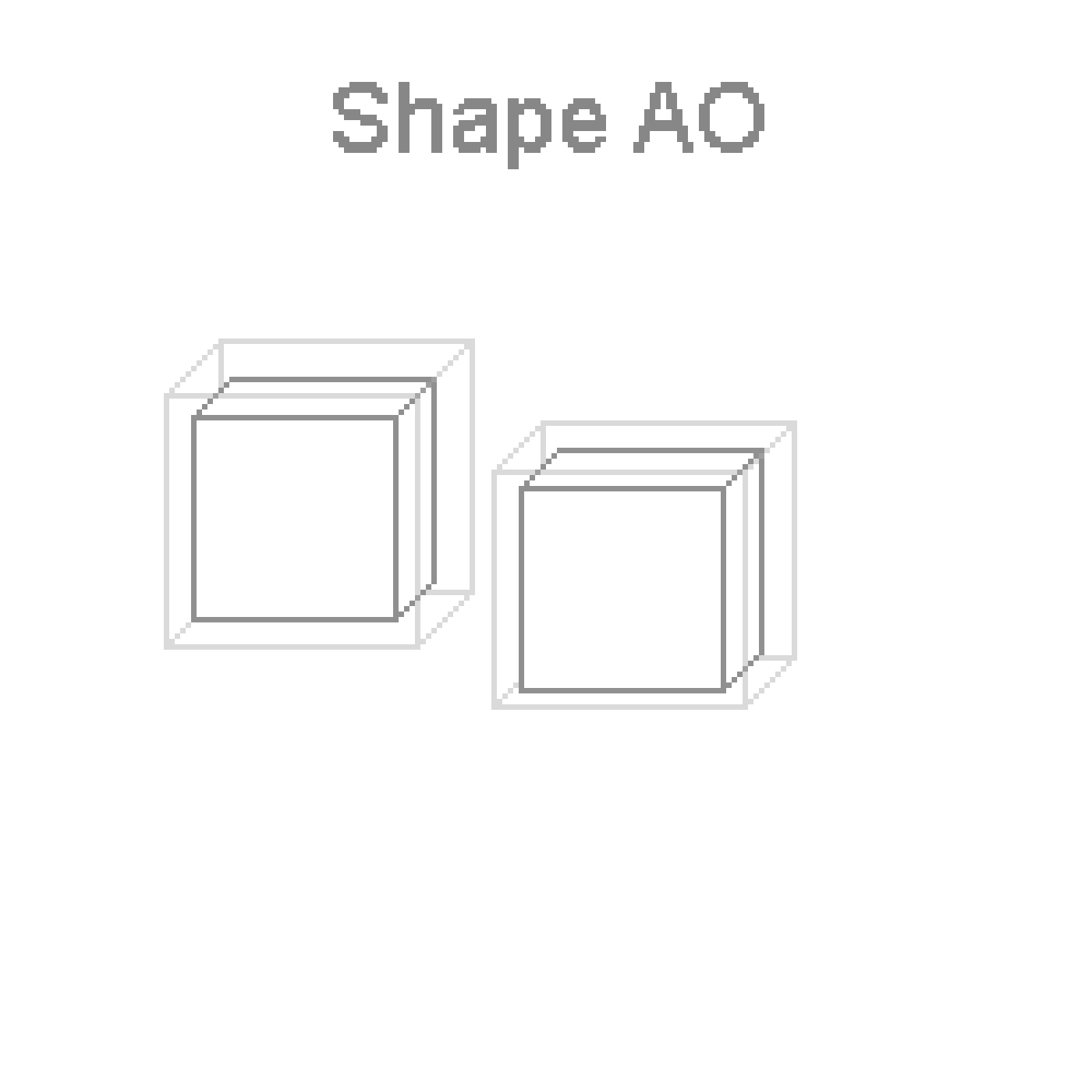
* Sphere-of-influence-occlusion
* Real-Time-multi-bounche-Shape-tracing
* per-object-ambient-occlusion + per-surface-ambient-occlusion
Crevasse Occlusion(real time soft shadows in crevasses) is one of the most important effects for photorealism.
Really avoiding per-pixel and doing per-shape/edge calculation when possible is best for getting high speed graphics rendering.
* per edge ambient occlusion
* shape-occlusion
* per object ambient occlusion
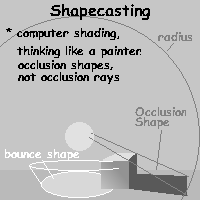
* shape-casting
AI systems capable of looking at the executable of a game, analyzing the game mechanics and assets and generating a new source code/modern project folder are cool.
Yeah AO is more in soft light contexts, less in direct light contexts.
CS:GO was my favorite era of graphics, I just really don't like the look of many modern engines man.
Modern engines run like sh*t and look like piss, like someone pissed all over the screen, it's just so bleak and overprocessed.
per-shape-crevasse-occlusion:
* every object has a sphere of darkness around it that only affect neighbour objects, darkness is from start of occlusion shape to object surface
* every shape has a sphere of darkness outward that only affects neighbours, not self
* every surface has a volume of darkness outward that only affects neighbour surfaces.
* check if occlusion penetrates surface of neighbour, then cancel effect
* Dark surface-aligned gradients, most dark at object contact point, least dark at occlusion shape entrance
edge-depolygonizer, dulling and grainer, is as important as phong shading, yet is nowhere to be seen in 2000s games, crazy.
Screen Space De-edger:
* mark edges in 3D-software that are to be de-edged.
* De-edge objects with marked edges using screen space algorithms.
De-edger types:
* De-polygonizing(perfect curves)
* dull-edger(for a wooden box for example)
* grainy-edger(for gravel for example, or a rocky wall)
* blades-edger(for grass towards a wall, hay in a barn for example, hair)
* brick-notches-edger
Screen Space Rough-Edging:
* Mark edges in 3d-software that are to be rough-edged
* Rough up edge in screen space with algorithms.
Shape tracing:
* Light generate light shapes, lights hit objects, generate shadow shapes, generate bounce shapes also(multi bounce shape tracing)
(AI-generated table)
| Area |
CPU (does) |
RAM (holds) |
GPU (does) |
VRAM (holds) |
| Game world |
Runs logic, input, AI, scripts |
Game state, entities, the scene tree |
— |
— |
| Physics |
Simulates, collides, raycasts (e.g. your AO clip planes) |
Collision shapes, physics bodies |
Sometimes particles and cloth |
Particle state |
| Assets on load |
Reads files, decompresses, uploads |
Temporary copies, freed after upload |
Copies them in (DMA) |
Meshes, textures, compiled shaders |
| Geometry |
Culling, LOD choice, sorting draws |
Bounding boxes, draw lists |
Vertex shading, rasterizing |
Vertex and index buffers |
| Textures |
Chooses which mips to stream |
Streaming queue |
Samples and filters per pixel |
Compressed textures and mipmaps |
| Animation |
Computes bone poses |
Skeletons, animation clips |
Skins the vertices |
Bone matrices for this frame |
| Lighting and AO |
Updates light and AO-shape lists |
Light and AO-shape data |
Tile culling, per-pixel lighting and AO |
Light and AO buffers, shadow maps |
| Per-frame data |
Writes camera, transforms, parameters |
Source values |
Reads them in shaders |
Per-frame copies in rotation (2–3 in flight) |
| Commands |
Records and submits command buffers |
Command-recording memory |
Executes them in order |
— |
| Output |
Requests present |
— |
Post-processing, presenting |
Render targets, depth buffer, final image |
| Readback (rare) |
Reads results a frame or two late |
Screenshots, timings, query results |
Writes results |
Copy-out buffers |
Render Boxes
Render boxes are a super retro way of doing computer visuals.
You place a camera inside a box and put models with skeletons and magnets and strings you control from the computer and call that the render box, you send the camera feed to the computer screen.
You can make some seriously cool sh*t with it, but yeah, a analogue super funky visuals solution.
There is a tank simulator that uses this, really cool stuff.
Minimalist screen translator
Translate cam-vision on face into a screen of dots on back/stomach.
Dr Vedur Versions Development
I like making my own versions of stuff, might or might not make available.
Linux^NW, Bettan^OS:
* Bookish Bauhaus
* flat metaphoric UI
* maintenance, support of devices, hardware, tools
Koda:
* AI-lib-management
* templates
* source-section-to-machine display(per selection)
* text Coloring: blue = abstract,not active, classes, class, functions, function declaration | red = active, functions, | green = data, variables,data structures, vertical mixing if something is more than one(headers)
* autofill
* Update manager
* Object, structs, programs visualizer(my favorite tool, you don't need to be good at abstract thinking for coding, you just need a non-abstract interface)
Blender Pro Mod:
* less clutered, repetive default workspace
* Auto UVs by default
* Rename edit-mode -> Edit/select-vertex mode
* Default theme modeling room, strong metaphor
* Scale-manager, making sure user stays within reasonable scale when it comes to texture and model resolution, set minimums and maxes
* Generic skeletons(human, for-legged-animals)
* Easy painting & texturing:
* layers, why isn't this a default is beyond me, tile-shader-layers, typical-texture-paint-layers, decal-layers
* greater default library, like Krita
* Decals/sprays
* typical painting to texture
* tile-shader-painting
* auto-instancing
Godot Pro Mod:
* Greater support of blender -> godot workflow
* greater support of 3D standards
* Greater support of compability rendering, cheap lightning techniques(multi-bounce,shape-tracing, shape/object-AO)
Ultimate Optimization/compression Cheat Sheet
* Code first, optimize later(get it out of your head first)
* Culling(camera-view-culling, top-down-then-vertical-culling)
* LODing(Mipmaps, model LODs)
* Instancing(one model/shader in VRAM used many times)
* proceduralizing(textures being combination of smaller textures)
* Simplifying math, doing less math
* Lookup-tables
* Difference fields(compression)
* Proceduralizing(compression, differences from a simply procedural geometric shape for example)
Polybox Development
Here I sketch on ideas for what is essentially Minecraft + Gmod, polygons, props and smaller boxes make up the world.
I am aiming for higher realism than minecraft
I need an entire second toolbar for dig/build modes
Tools:
* Terrain mode -> greater hills, greater holes
* directional pile/hole mode -> for directional piles, holes, good for mining, outward shapes from mountains
* soft terrain box mode -> for building/excavating building foundations
* Box mode -> 0.5m/0.25m boxes, diagonal cut boxes, stairs, props aligned with grid
* prop mode -> free placement of props, glued or free to move, Like Gmod or Rust
* poly mode -> fine modeling with cut, mirror, bevel, axis align, extrude, proprtional editing...
* Smooth out tool -> for reseting messed up terrain
* Cart lines
* Electricity, Voltage controllers
* Audio-shape-tracing
Aimed at people too smart for minecraft, too dumb for blender and unity.
Blender + unity requires strong abstract thinking, polybox doesn't.
Default maps:
* Surreal island(philosophical exploration)
* Meditereanean
* flatgrass
Gaming Tips
FPS:
* Don't overextend(My friend used to scream this at me all the time lol)
* Stay to the corners